Instagram Black & White Heartbreak AI Photo Editing Prompt
PROMPT
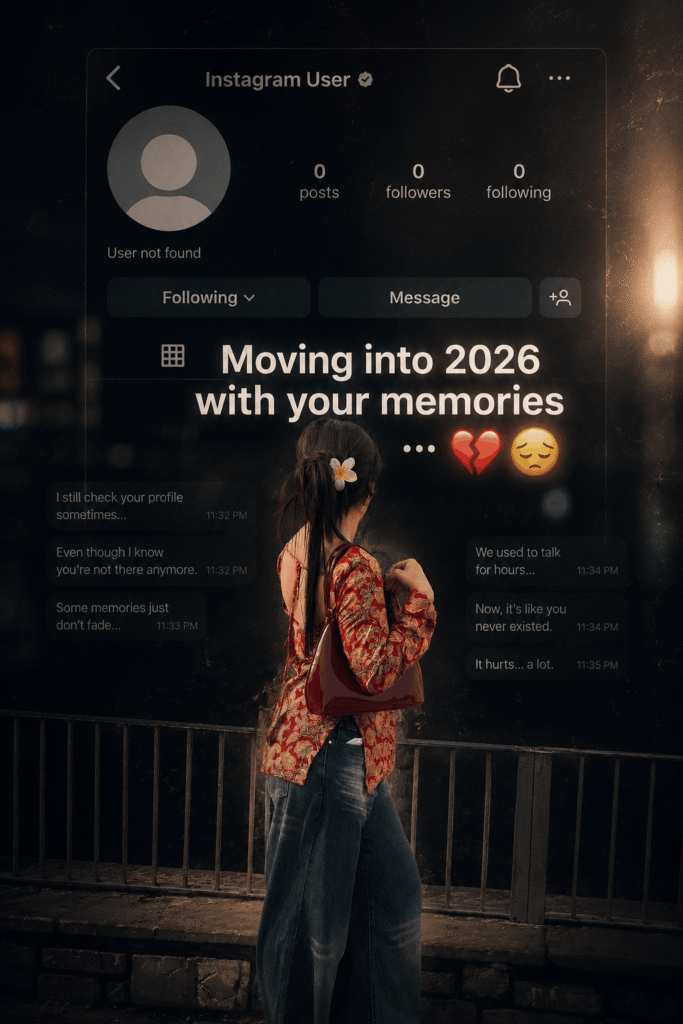
Create a dark, emotional Instagram heartbreak memories edit using the uploaded photo. Keep the person’s face, hairstyle, skin tone, body shape, clothes, and pose 100% unchanged. Do not modify identity. Design: • Background should be dark, faded, and slightly blurred. • Add a large semi-transparent Instagram profile interface behind the subject. • Profile picture should appear removed with a default Instagram avatar. • Username: “Instagram User” • Add Profile, Search, Mute, and Options icons. • Use a black and grey color theme with a soft vignette. • Add subtle film grain, motion blur, dust particles, and cinematic lighting. • Place the subject at the bottom center with a soft shadow. Text (large bold white font): “Moving into 2026 with your memories” Below the text add: … Additional effects: • Broken heart emoji • Sad emoji • Faded chat/message overlays in the background. • Instagram aesthetic, nostalgic breakup vibe. • Moody color grading with low saturation. • High contrast, realistic photo edit. • Soft glow around the subject. • Premium viral Instagram reel thumbnail style. • Ultra HD, photorealistic, 4K quality. • No cartoon, no anime, no AI-looking face. • Keep everything natural and cinematic.
Description
Instagram Black & White Heartbreak AI Photo: Instagram trends change almost every month, but emotional edits continue to dominate reels, stories, and profile posts. One style that has become especially popular is the cinematic heartbreak photo edit. Instead of using colorful backgrounds and heavy effects, creators are now choosing dark forest scenes, monochrome color grading, nostalgic Instagram interface overlays, and emotional typography to create images that instantly grab attention.
This Cinematic Black & White Instagram Heartbreak AI Photo Editing Prompt is designed for users who want a premium-quality social media edit while keeping the original subject completely natural. The prompt focuses on preserving the person’s identity, pose, clothing, hairstyle, and facial features while transforming the environment into an emotional cinematic composition. Whether you create AI artwork for Instagram, Facebook, Pinterest, or YouTube, this prompt helps generate a dramatic yet realistic result that feels professionally edited instead of artificially generated.
If you’re looking for a viral ChatGPT image prompt in 2026 that delivers realistic Instagram edits with minimal effort, this guide will show you everything you need to know.
What is the Cinematic Black & White Instagram Heartbreak AI Photo Editing Prompt?

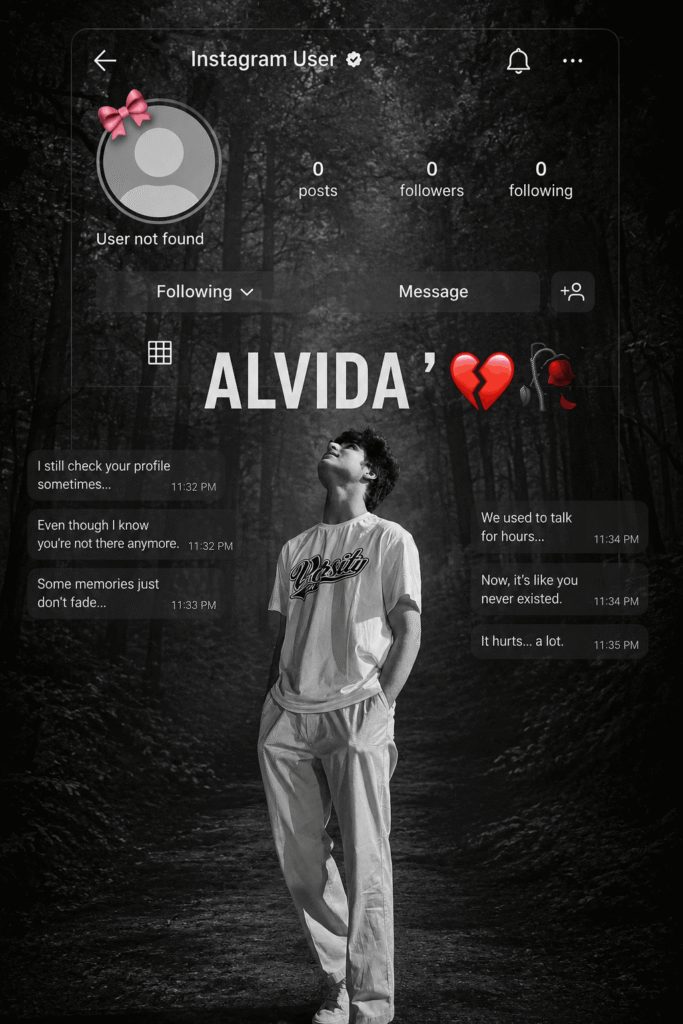
The Cinematic Black & White Instagram Heartbreak Prompt is an advanced AI editing prompt created specifically for realistic portrait transformations. Instead of changing the person, the prompt enhances the environment, mood, lighting, and overall storytelling.
The main purpose of this prompt is to recreate the feeling of memories, heartbreak, nostalgia, and emotional distance using a dark forest background, Instagram-inspired interface elements, cinematic lighting, and carefully balanced black-and-white color grading.
Why This AI Prompt is Trending in 2026?
Emotional storytelling has become one of the strongest content formats across Instagram Reels, Pinterest, Facebook, and YouTube Shorts. Instead of flashy effects, audiences now connect more with cinematic visuals that create emotion.
The dark forest background immediately creates mystery, while the Instagram profile interface reminds viewers of lost memories and unfinished conversations. The balanced monochrome color grading adds a nostalgic feeling without making the image look too dark. Because the subject remains completely natural, viewers often believe the edit was created manually in Photoshop instead of AI.
Another reason for its popularity is its simplicity. Users only need one clear portrait and a properly written prompt to generate a professional-looking result in just a few minutes.
The combination of realistic editing, emotional storytelling, and social media aesthetics makes this one of the most shared AI photo editing prompts of 2026.
Features of This AI Prompt
This AI editing prompt focuses on realism rather than fantasy. Every part of the edit is designed to improve the visual storytelling while preserving the original portrait.
The prompt keeps the person’s face, hairstyle, skin tone, clothing, body proportions, and pose exactly as they appear in the uploaded image. Instead of replacing the subject, it carefully builds a cinematic environment around them.
How to Use This Prompt in ChatGPT?
Using this prompt is surprisingly simple, even if you’ve never created AI images before.
Start by choosing a clear portrait photo where the person is visible without heavy blur or unnecessary objects blocking the body. A higher-quality image usually produces a much better final result.
Next, upload your template image that contains the Instagram interface layout. This template acts as the design reference, allowing the AI to keep the placement of all interface elements exactly the same.
Best Settings for Better Results
| Setting | Recommended Value |
|---|---|
| Style | Cinematic Black & White |
| Quality | Ultra HD / 4K |
| Lighting | Soft Cinematic Lighting |
| Camera | DSLR Portrait Style |
| Aspect Ratio | 4:5 or 9:16 |
Pro Tips for Viral Results
Choosing the right source image often makes a bigger difference than adding extra effects. A portrait with natural lighting allows the AI to preserve facial details much more accurately.
Images where the subject is standing alone usually create a stronger emotional impact because the background can be replaced more cleanly.
Avoid using heavily filtered social media photos, as excessive sharpening or beauty filters may reduce realism after AI processing.
Keeping the expression natural instead of exaggerated helps the final artwork appear more cinematic and believable.
Using high-resolution uploads gives the AI additional detail to work with, especially around the eyes, hair, and clothing textures.
Common Mistakes to Avoid
Many beginners accidentally upload blurry screenshots instead of original photos, which significantly reduces image quality.
Another common mistake is cropping the subject too tightly, leaving little room for the cinematic background to appear naturally.
Some users increase contrast too aggressively after generation, causing facial details to disappear. Balanced editing always produces better results.
Using multiple conflicting editing prompts at once can also confuse the AI and create inconsistent outputs.
Finally, avoid replacing the person’s facial features or identity. The strength of this prompt lies in preserving realism while changing only the atmosphe
Where Can You Use These Images?
These cinematic edits are perfect for Instagram Reels covers, profile posts, and emotional story updates where visual storytelling matters.
Many creators also use them on Facebook to create eye-catching posts that encourage engagement without requiring lengthy captions.
Pinterest users frequently save this style of artwork because it blends photography with cinematic design, making it highly shareable.
Why People Love This Prompt?
One of the biggest reasons people enjoy this AI prompt is that it enhances emotion without making the image feel fake. Instead of replacing the person’s appearance, it builds a cinematic atmosphere around them, allowing viewers to focus on the story behind the image.
The Instagram interface overlay adds an extra layer of nostalgia, making the artwork instantly recognizable to social media users. Combined with realistic monochrome grading and dramatic lighting, the final result feels polished enough to resemble a professional Photoshop edit.
Alternative Versions of This Prompt
The first variation replaces the forest background with a rainy nighttime city illuminated by streetlights while keeping the Instagram interface and cinematic monochrome style unchanged.
Another version uses a fog-covered mountain landscape to create a more peaceful and reflective mood while maintaining realistic facial details and balanced lighting.
A third variation transforms the background into an abandoned railway station with soft cinematic fog, vintage textures, and subtle film grain for an even stronger nostalgic atmosphere.
Some Question
What is the Cinematic Black & White Instagram Heartbreak AI Prompt?
It is an AI image prompt that transforms a normal portrait into a realistic emotional Instagram-themed cinematic artwork while preserving the original subject.
Can I use this prompt in ChatGPT?
Yes. It is designed specifically for AI image generation in ChatGPT and similar AI platforms that support image editing.
Does this prompt change the person’s face?
No. The prompt is written to preserve the person’s identity, facial features, hairstyle, clothing, body shape, and pose.
Why is this prompt popular in 2026?
Its realistic cinematic editing style matches current Instagram trends focused on emotional storytelling and nostalgic visuals.
Is this prompt suitable for beginners?
Yes. Even users with no editing experience can achieve professional-looking results by uploading a clear portrait and using the prompt correctly.
Can I upload my own template image?
Yes. The prompt is designed to work with a template image that contains the desired Instagram interface layout.
Which aspect ratio is best?
Portrait ratios such as 4:5 and 9:16 usually perform best for Instagram posts and Reels.
Can I use the generated image commercially?
That depends on the AI platform you use and the rights associated with your source images. Always review the platform’s terms before commercial use.
Does this prompt work with color photos?
Yes. The AI automatically converts the scene into a balanced cinematic black-and-white style while preserving important details.