Digital Collage AI Photo Editing Prompt, Create Instagram Portraits with ChatGPT
PROMPT
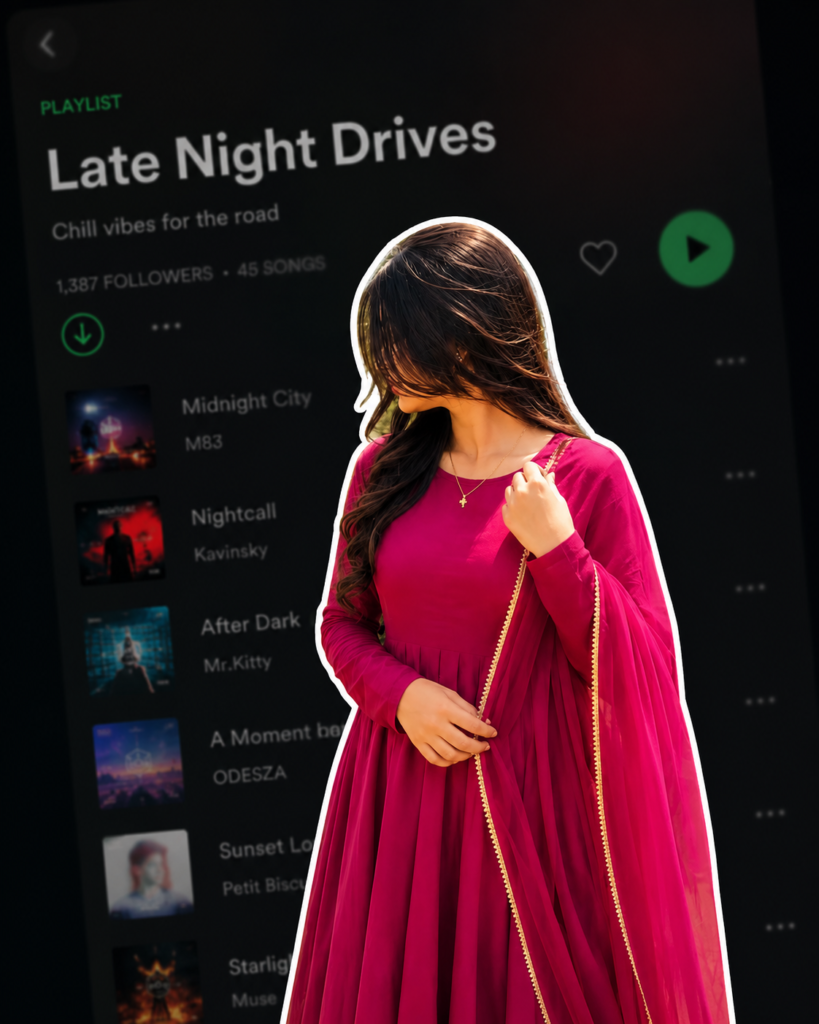
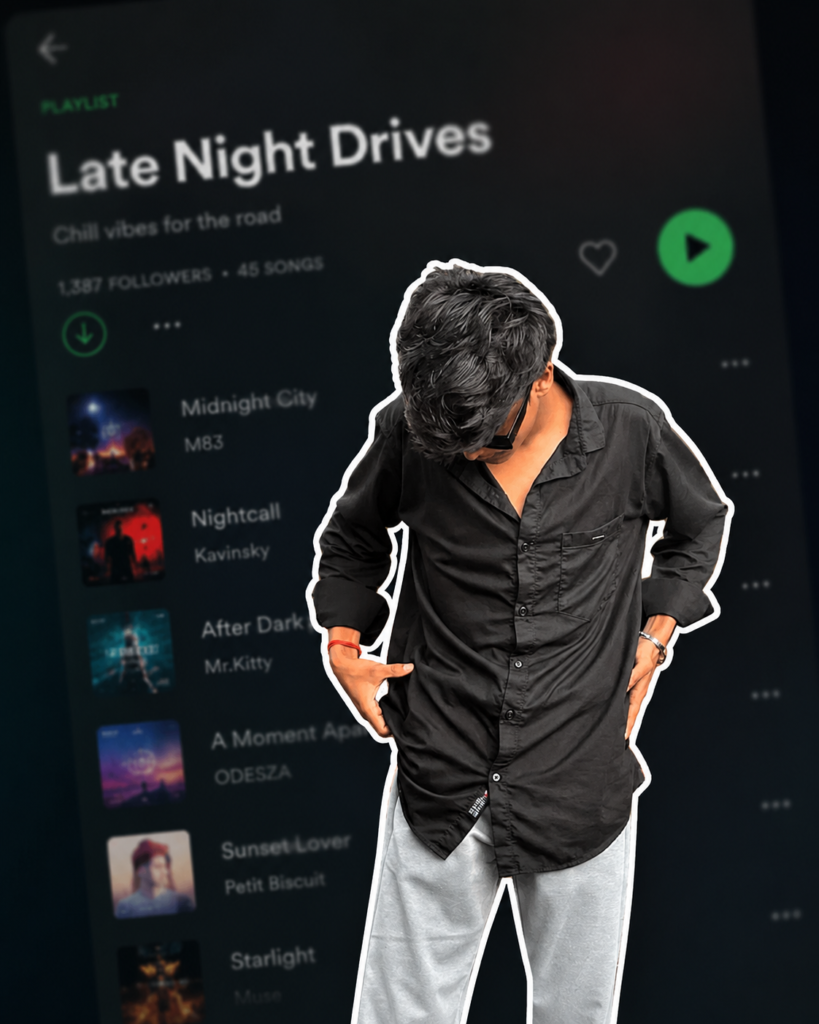
Use the uploaded reference image as the exact reference. Preserve the person's identity, facial features, skin tone, hairstyle, pose, expression, and body proportions exactly as shown. Keep the clothing 100% identical to the reference image. Do not change the outfit, colors, patterns, fabric, accessories, or fit. Preserve every detail of the original clothing exactly as in the uploaded image. Create a premium digital collage style portrait. Cut out the subject with a thick white sticker-like outline, giving it a modern editorial collage look. Keep the pose natural and relaxed, with the person looking slightly downward with a calm, confident expression. If the reference image includes a hand near the face or clothing, preserve that naturally. The background should be a heavily blurred dark-mode mobile music streaming app playlist, creating a stylish and modern aesthetic while keeping the focus entirely on the subject. Use soft ambient lighting, clean shadows, premium cinematic color grading, subtle film grain, high contrast, realistic skin texture, ultra-sharp details, HDR quality, and a minimal editorial design. Ensure the face remains 100% recognizable and matches the uploaded reference perfectly. Do not alter the hairstyle, facial features, outfit, accessories, or overall appearance. The only transformation should be the digital collage effect, thick white sticker outline, and the blurred playlist background. Ultra-realistic, Instagram aesthetic, premium graphic design, editorial quality, realistic depth of field, clean composition, 4K, HDR, vertical 4:5 aspect ratio.
Description
If you enjoy creating eye-catching Instagram photos, viral profile pictures, or premium AI portraits, you have probably noticed that digital collage editing has become one of the biggest photo editing trends of 2026. Instead of using ordinary filters or simple background effects, creators are now transforming their photos into stylish editorial portraits with the help of detailed AI prompts.
The best part is that you no longer need advanced editing skills or expensive software to achieve this look. A well-written Digital Collage AI Photo Editing Prompt can help you create professional-looking results in just a few moments. Whether you are an Instagram creator, content creator, graphic designer, or someone who simply loves creative AI editing, this prompt makes the entire process much easier.
This particular prompt focuses on creating a premium digital collage portrait while keeping the original appearance consistent. It combines a modern sticker-style cutout effect, cinematic color grading, realistic lighting, and a beautifully blurred music playlist background to create an image that looks clean, stylish, and ready for social media.
What is a Digital Collage AI Photo Editing Prompt?
A Digital Collage AI Photo Editing Prompt is a carefully written instruction that tells an AI image model how to transform an existing photograph into a modern artistic portrait. Instead of manually editing every detail in professional software, you simply describe the visual style you want, and the AI creates an enhanced version based on those instructions.
Unlike traditional editing, this approach focuses on combining several creative effects into one final image. These effects often include sticker-style outlines, premium lighting, cinematic colors, realistic skin textures, subtle film grain, depth of field, and clean editorial compositions.
One of the biggest reasons creators prefer this editing method is consistency. When the prompt is written properly, the AI understands the artistic direction much better, producing images that feel polished rather than randomly generated.

Why This Digital Collage AI Prompt is Trending in 2026?
Artificial intelligence has completely changed the way people create digital artwork. In 2026, creators are searching for prompts that generate images with a premium appearance while keeping the editing process simple.
That is exactly why this Digital Collage AI Photo Editing Prompt has gained so much popularity.
Social media platforms now reward visually attractive content more than ever before. High-quality portraits often receive better engagement because they immediately capture the viewer’s attention while scrolling.
Another reason behind this trend is the growing demand for personalized content. Instead of downloading random wallpapers or stock images, users now want portraits that reflect their own personality while maintaining a modern editorial style.
The digital collage effect also feels fresh. The combination of a sticker outline, cinematic lighting, HDR quality, realistic textures, and blurred music playlist background creates a design that looks both artistic and professional.
Digital Collage AI Photo Editing Prompt
One of the biggest strengths of this prompt is its attention to visual quality. Every instruction is written to create a premium editorial portrait rather than a simple filtered image.
The artistic collage effect adds a fashionable magazine-inspired appearance while keeping the overall composition clean and minimal. Instead of distracting visual elements, the design focuses on highlighting the subject naturally.
Another impressive feature is the thick white sticker outline. This simple design choice creates depth and instantly gives the portrait a modern graphic design style that looks perfect for Instagram.
How to Use This Digital Collage AI Photo Editing Prompt in ChatGPT
Using this Digital Collage AI Photo Editing Prompt is much easier than many people think. You do not need professional editing experience or advanced graphic design skills. If you have a good-quality reference photo and the right prompt, you can create a premium editorial portrait within minutes.
Step 1: Choose a High-Quality Reference Image
The first step is selecting a clear reference image. The better the original photo, the better the AI can understand the subject’s appearance and overall styling.
Step 2: Upload the Image
Open ChatGPT with image generation enabled and upload your reference image.
Step 3: Copy and Paste the Prompt
After uploading the image, simply copy the complete Digital Collage AI Photo Editing Prompt and paste it into the chat.
The prompt already contains detailed instructions about lighting, composition, background style, cinematic colors, sticker outline, realistic textures, and editorial design. There is usually no need to add extra instructions unless you want to personalize the final result.
Step 4: Generate the Image
Once everything is ready, ask ChatGPT to generate the image.
The AI will analyze the uploaded reference and apply the requested artistic transformation while creating a stylish digital collage portrait with a premium Instagram aesthetic.
If the first result is not exactly what you imagined, you can slightly adjust the prompt or regenerate another version.
Step 5: Download and Share
After generating your favorite version, save the image in high resolution.
You can immediately use it for Instagram posts, profile pictures, Facebook uploads, Pinterest pins, YouTube community posts, wallpapers, or even personal branding projects.
Best Settings for Better Results
Although the prompt performs well on its own, using the right settings can improve the overall quality of the generated image.
| Setting | Recommended Value |
|---|---|
| Style | Premium Editorial Digital Collage |
| Quality | Ultra HD / 4K |
| Lighting | Soft Ambient Cinematic Lighting |
| Camera | Portrait Photography |
| Color Grading | Cinematic HDR |
| Background | Blurred Dark Music Playlist |
| Detail Level | Ultra Sharp |
| Aspect Ratio | Vertical 4:5 |
These settings help create a cleaner composition while maintaining a modern Instagram-ready appearance.
Pro Tips for Creating Viral AI Portraits
Creating a beautiful AI portrait is only the beginning. Small improvements can make the final image look much more professional and increase its chances of performing well on social media.
Start with a high-resolution image whenever possible. AI generally produces cleaner details when the original photo is sharp.
Natural lighting usually delivers better facial detail than dark or heavily filtered photos.
Avoid uploading blurry selfies because missing facial details may reduce overall image quality.
Keep the prompt detailed instead of extremely short. More descriptive prompts usually give the AI a clearer artistic direction.
Common Mistakes to Avoid
Many beginners expect perfect results on the very first attempt. In reality, small improvements often lead to much better images.
Using low-quality reference photos is one of the biggest mistakes. Poor lighting and blurry details make it harder for AI to create realistic portraits.
Another common mistake is editing an image multiple times with different prompts. This often reduces image quality instead of improving it.
Where Can You Use These AI Portraits?
One reason this Digital Collage AI Photo Editing Prompt has become so popular is its flexibility.
The finished portrait works perfectly as an Instagram post because the clean editorial style naturally attracts attention in the feed.
Many creators also use these portraits as Facebook profile pictures or cover images to give their accounts a more premium appearance.
Why People Love This Digital Collage AI Photo Editing Prompt
Every year, new AI photo editing styles become popular, but only a few remain favorites among creators for a long time. The Digital Collage AI Photo Editing Prompt has become one of those styles because it combines simplicity with a premium visual appearance.
Many users appreciate how professional the final image looks without requiring complicated editing software. Instead of spending hours adjusting layers, backgrounds, lighting, and colors manually, they can achieve a polished editorial look with a single well-written prompt.
Another reason this prompt stands out is its clean composition. The sticker-style outline naturally separates the subject from the background, creating a modern magazine-inspired effect that looks attractive on Instagram and other social media platforms.
FAQs
What is a Digital Collage AI Photo Editing Prompt?
A Digital Collage AI Photo Editing Prompt is a detailed instruction that guides an AI image generator to create a modern editorial-style portrait using creative effects such as sticker outlines, cinematic lighting, realistic textures, and premium color grading.
Can beginners use this prompt?
Yes. Even if you have never edited photos before, you can use this prompt by uploading a good-quality reference image and following the instructions provided in this guide.
Which aspect ratio works best?
The recommended aspect ratio is 4:5 because it fits Instagram posts perfectly and provides a professional vertical layout.
Do I need Photoshop?
No. The purpose of this prompt is to help generate a professional-looking collage portrait without manually editing every detail in software like Photoshop.
Can I use this prompt for Instagram profile pictures?
Yes. Many creators use this editing style for Instagram profile photos because it creates a clean and premium appearance.
Which lighting produces the best results?
Soft ambient lighting combined with cinematic color grading usually delivers the most realistic and visually appealing portraits.
Does image quality matter?
Absolutely. A high-resolution reference image generally helps produce sharper details and a cleaner final result.
Can I customize the background?
Yes. You can modify the prompt by describing a different background style while keeping the overall collage effect and editorial composition.