Eye Focus 3-Panel AI Photo Editing Prompt (2026)
PROMPT
Use the uploaded reference image as the identity reference. Preserve the face, eye shape, skin tone, hairstyle, and facial features 100% exactly.

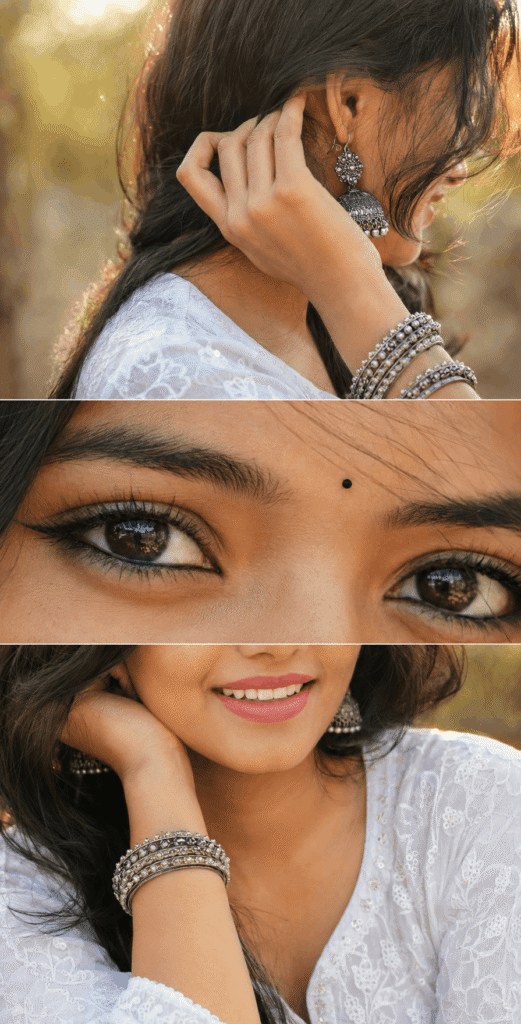
Create a premium vertical 3-panel collage.

Top panel: Close-up from behind/right side with the face mostly hidden (only a tiny cheek or jawline visible), focus on a large oxidized silver jhumka, hand gently touching the ear, stacked oxidized silver bangles, soft black kajal barely visible, loose hair strands, warm golden sunlight, creamy bokeh, shallow depth of field.

Middle panel (main focus): Ultra-realistic extreme macro close-up of both eyes with bold black kajal, subtle winged eyeliner, long natural eyelashes, thick eyebrows, glossy deep brown eyes, crystal-clear catchlights, tiny black bindi, flawless skin texture, DSLR macro photography.

Bottom panel: Lower half of the face with a soft smile, white embroidered cotton kurta, wrist resting near the face displaying oxidized silver bangles, loose hair strands, warm golden-hour lighting, soft creamy bokeh.

Photorealistic, luxury fashion editorial, Canon EOS R5, 85mm lens, f/1.8, HDR, ultra-detailed skin texture, realistic lighting, premium Instagram aesthetic, clean 3-panel layout, 8K, ultra-sharp.
Description
If you’ve been scrolling through Instagram lately, you’ve probably noticed a new portrait trend that’s impossible to ignore. Instead of showing the entire face in one photo, creators are using beautifully designed three-panel collages that tell a visual story. One frame highlights elegant jewelry, another captures mesmerizing eyes, and the final frame focuses on a natural smile. The result feels cinematic, luxurious, and highly artistic.
This Eye Focus 3-Panel AI Photo Editing Prompt is one of the most popular AI portrait editing styles in 2026. It combines fashion photography, DSLR-quality realism, and editorial aesthetics into a single vertical collage that’s perfect for Instagram Reels, profile posts, Pinterest, and premium portfolios.
Whether you’re an Instagram creator, AI artist, digital photographer, ChatGPT user, or someone who simply enjoys experimenting with AI-generated portraits, this prompt can help you create breathtaking results with very little effort. By using a reference image and a carefully crafted prompt, you can preserve your facial identity while achieving a professional luxury fashion look that resembles a high-end magazine shoot.
In this complete guide, you’ll learn how the prompt works, why it’s trending, how to use it inside ChatGPT, the best settings, expert tips, common mistakes, and multiple prompt variations that can make your AI portraits stand out from millions of others.
What is the Eye Focus 3-Panel AI Photo Editing Prompt?
The Eye Focus 3-Panel AI Photo Editing Prompt is a premium AI image generation prompt designed to create an elegant vertical collage using three separate portrait compositions.
Full AI Prompt

Instead of generating a standard selfie, the prompt divides the final image into three artistic sections:
- A stylish close-up featuring oxidized silver jewelry and soft golden light.
- An ultra-detailed macro shot focusing on expressive eyes.
- A warm lower-face portrait highlighting a natural smile and fashionable accessories.
The prompt is specially designed to maintain facial identity from an uploaded reference image. It preserves facial features while enhancing lighting, camera quality, and composition to produce an editorial-grade result.
Unlike ordinary AI portrait prompts, this one creates a storytelling effect that feels sophisticated and visually balanced.
Why This AI Prompt is Trending in 2026?
The popularity of this prompt isn’t accidental. Several social media trends have contributed to its rapid growth.
Premium Fashion Look
Luxury-inspired portraits consistently receive strong engagement because they resemble professional fashion campaigns.
Eye-Focused Photography
Eye photography has become one of Instagram’s most engaging portrait styles. Detailed eyes naturally attract viewers and encourage longer watch times.
AI Identity Preservation
Modern AI tools can preserve facial identity much more accurately than earlier versions. This allows creators to generate realistic portraits without losing their recognizable appearance.
Instagram-Friendly Composition
Vertical three-panel layouts occupy more screen space, making them ideal for Instagram posts, Reels covers, Pinterest Pins, and Stories.
Professional DSLR Feel
Camera specifications like Canon EOS R5, 85mm lens, HDR photography, and shallow depth of field help AI generate results that resemble real professional photography.
Features of This Prompt
This AI prompt offers numerous premium photography elements.
- Preserves face identity from the uploaded reference image
- Elegant three-panel vertical collage
- Luxury editorial composition
- Ultra-realistic eye macro photography
- Warm golden hour lighting
- DSLR-style depth of field
- Natural skin texture
- Oxidized silver jewelry details
- Soft cinematic bokeh background
- Premium Instagram aesthetic
- Realistic HDR lighting
- Ultra-sharp 8K quality
- Fashion magazine style composition
- High-quality facial detailing
- Natural color grading
How to Use This Prompt in ChatGPT?
Creating this portrait is surprisingly easy if you follow the correct process.
Step 1: Upload Your Reference Image
Choose a clear, high-resolution portrait with good lighting.
Step 2: Open ChatGPT Image Generation
Use ChatGPT’s image generation feature and upload your reference photo.
Step 3: Paste the Complete Prompt
Copy the full prompt exactly as provided above.
Step 4: Generate the Image
Allow ChatGPT to process the request and create the premium collage.
Step 5: Download and Share
After reviewing the output, use the best version for Instagram, Facebook, Pinterest, or your portfolio.
Best Settings for Better Results
| Setting | Recommended Value |
|---|---|
| Style | Luxury Fashion Editorial |
| Quality | Ultra HD 8K |
| Lighting | Warm Golden Hour |
| Camera | Canon EOS R5 |
| Lens | 85mm |
| Aperture | f/1.8 |
| HDR | Enabled |
| Depth of Field | Shallow |
| Focus | Ultra Macro Eyes |
| Aspect Ratio | 9:16 Vertical |
Pro Tips for Viral Results
Creating a beautiful AI image is only the first step. Here are expert tips to maximize quality and engagement.
- Upload a sharp reference image.
- Use natural daylight photos as the reference.
- Avoid heavy beauty filters in the original image.
- Maintain consistent facial angles.
- Keep jewelry realistic and elegant.
- Use warm golden-hour lighting whenever possible.
- Focus on clean skin rather than excessive smoothing.
- Select high-resolution exports.
- Post during your audience’s peak activity hours.
- Pair the image with engaging captions.
- Add trending Instagram hashtags.
- Maintain a consistent aesthetic across your profile.
- Experiment with slight lighting variations.
- Avoid overcrowded backgrounds.
- Keep the three panels visually balanced.
Common Mistakes to Avoid
Many beginners don’t achieve premium results because they overlook a few important details.
Avoid these common mistakes:
- Using blurry reference images
- Cropping the face too tightly
- Uploading low-resolution photos
- Overloading the prompt with unnecessary instructions
- Using unrealistic skin smoothing
- Choosing poor lighting
- Ignoring facial proportions
- Mixing too many photography styles
- Using incorrect aspect ratios
- Forgetting identity preservation instructions
Where Can You Use These Images?
The versatility of this AI portrait prompt makes it suitable for many platforms.
Ideal for profile posts, carousel posts, Stories, and Reels covers.
Perfect for fashion pages, creator profiles, and AI photography showcases.
YouTube Thumbnail
Creates attention-grabbing thumbnails for beauty, AI editing, and tutorial videos.
WhatsApp DP
Produces elegant display pictures with a premium look.
Highly shareable for fashion, photography, and AI art boards.
Blog Posts
Excellent for articles about AI prompts, image generation, and digital creativity.