Luxury Cinematic Half Face Portrait Prompt (2026)
PROMPT
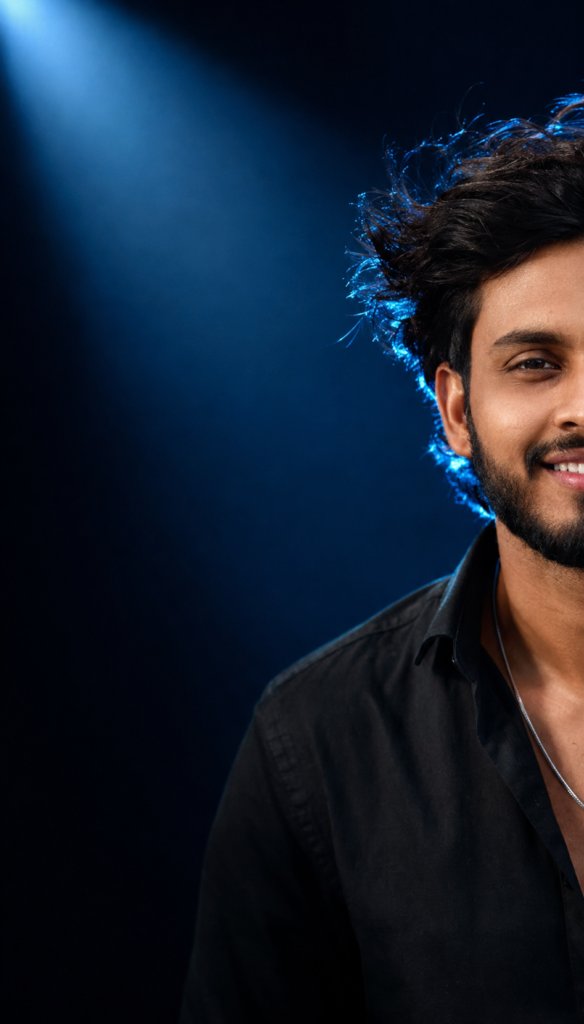
Use the uploaded reference image ONLY for facial identity. STRICT IDENTITY LOCK: Preserve the person's exact face, facial proportions, hairstyle, beard, eyebrows, eyes, nose, lips, skin tone, expression, and natural identity with zero changes. Create an ultra-realistic luxury cinematic studio portrait. Composition: Only the right half of the face is visible, approximately 50% cropped. The subject is positioned on the extreme right side of the frame with large negative space on the left. Looking directly into the camera with a genuine natural smile showing teeth. Lighting: Professional soft beauty key light from front-right. Strong electric blue rim light behind the head and shoulders. Blue backlight illuminating the hair edges. Soft blue spotlight from the upper-left creating cinematic atmosphere. Deep shadows with dramatic contrast. Background: Dark navy blue to black gradient background with subtle volumetric blue light, light haze, minimal blue particles, premium studio environment. Camera: Canon EOS R5, RF 85mm f/1.8 portrait lens, f/1.8, ISO 100, shallow depth of field, HDR, ultra-sharp eyes, realistic skin pores, detailed hair strands, premium editorial photography. Color grading: Deep blacks, cool blue highlights, natural warm skin tones, luxury magazine cover quality, ultra realistic, 8K, photorealistic.
Description
Creating premium-quality portraits no longer requires an expensive camera, a professional studio, or years of photography experience. Thanks to the latest AI image generation tools, anyone can transform an ordinary photo into a luxury editorial portrait in just a few minutes. One well-written prompt can produce results that look like they belong on the cover of a fashion magazine.
One of the most popular trends in 2026 is the Luxury Cinematic Half Face Portrait Prompt. This style combines dramatic blue lighting, a dark studio background, and ultra-realistic skin details to create an image that immediately grabs attention. The portrait focuses on only half of the face, making the composition look modern, premium, and highly artistic.
What Is the Luxury Cinematic Half Face Portrait Prompt?
The Luxury Cinematic Half Face Portrait Prompt is an advanced AI photo editing prompt that transforms an ordinary portrait into a professional-looking studio photograph. Instead of changing the person’s appearance, the prompt focuses on improving lighting, composition, camera quality, and cinematic mood while preserving the original identity.
Unlike many AI prompts that generate completely new faces, this prompt includes a strict identity lock. This instruction tells the AI to maintain the exact facial proportions, hairstyle, beard, eyebrows, eyes, nose, lips, expression, and skin tone from the uploaded reference image. The result feels authentic because the person still looks exactly like themselves.

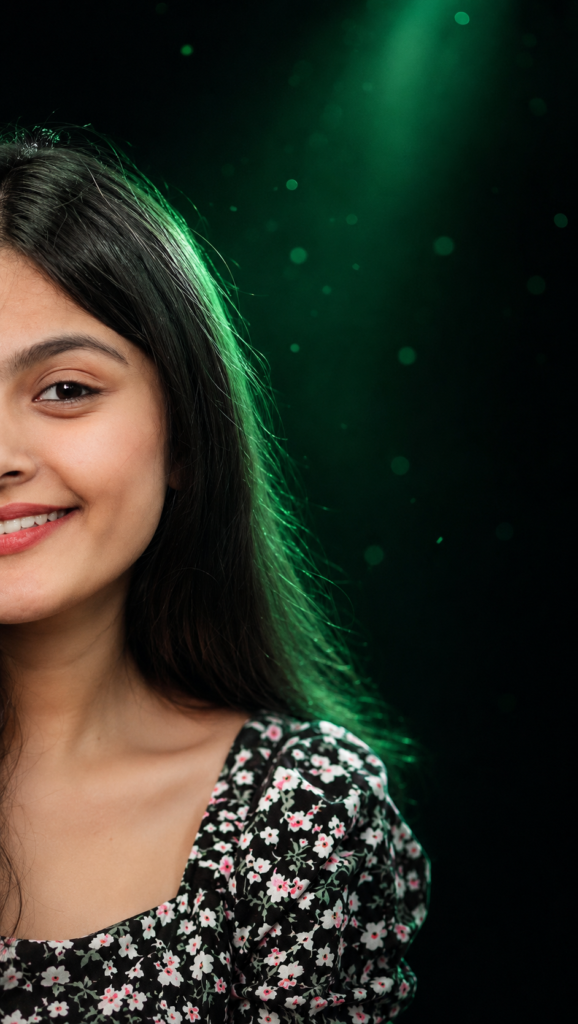
Another defining feature of this prompt is its unique composition. Only the right half of the face remains visible, while the rest of the frame is filled with clean negative space. This artistic layout has become extremely popular among photographers because it creates a luxurious editorial style that instantly stands out on social media.
Why This AI Portrait Prompt Is Trending in 2026
Artificial intelligence has completely changed the way people create visual content. Instead of relying only on expensive editing software or studio photography, creators now use detailed prompts to produce magazine-quality portraits within minutes.
The Luxury Cinematic Half Face Portrait Prompt has become especially popular because it combines realism with artistic storytelling. The dramatic blue lighting immediately catches the viewer’s attention while the half-face composition creates a sense of mystery that encourages people to stop scrolling and take a closer look.
Features of This Luxury Cinematic Portrait Prompt
One of the biggest strengths of this AI portrait prompt is its ability to combine technical photography principles with creative visual storytelling. Every part of the prompt has been carefully written to guide the AI toward producing a premium editorial portrait rather than a generic AI-generated image.
The identity preservation system is one of its standout features. Instead of allowing the AI to redesign the person’s face, the prompt instructs it to maintain every important facial detail. This helps create portraits that still look natural while benefiting from professional studio lighting and advanced color grading.
The cinematic composition adds another layer of sophistication. Showing only the right half of the face creates a balanced layout with generous negative space on the left. This style is widely used in luxury magazine covers because it naturally draws attention to the subject’s expression while leaving room for creative text placement if needed.
How to Use This Prompt in ChatGPT
Using this cinematic portrait prompt is surprisingly simple, even if you are completely new to AI image generation. The most important part is choosing a clear reference photo because the final quality depends heavily on the image you upload. A photo with a visible face, natural lighting, and good resolution allows the AI to preserve facial identity more accurately.
After selecting your reference image, open ChatGPT or another AI image generation platform that supports image creation. Upload your portrait first and then paste the complete prompt exactly as provided above. There is usually no need to rewrite or shorten the instructions because every line contributes to the final cinematic effect.
Once the prompt is submitted, allow the AI to process the request. Depending on the platform, image generation may take a few seconds or slightly longer. During this time, the AI analyzes your reference photo, follows the identity preservation instructions, and recreates the portrait with professional studio lighting, premium color grading, and realistic camera effects.
Best Settings for Better Results
The prompt itself is extremely important, but the generation settings can also influence the final quality. Using high-quality rendering options and portrait-friendly aspect ratios generally produces cleaner details and more realistic skin textures. If your AI platform allows advanced settings, the following recommendations can help you achieve consistent results.
| Setting | Recommended Value |
|---|---|
| Style | Ultra Realistic Editorial Photography |
| Quality | Highest Available or HD/8K Quality |
| Lighting | Cinematic Blue Studio Lighting |
| Camera | Canon EOS R5 with 85mm Portrait Lens |
| Aspect Ratio | 4:5 for Instagram or 1:1 for Profile Photos |
A portrait-oriented aspect ratio works especially well because it keeps the face as the main subject while preserving the dramatic negative space on the left side of the frame. For Instagram posts, the 4:5 format often provides the best balance between image quality and screen coverage.
High rendering quality is equally important. Premium settings allow the AI to generate finer hair strands, sharper eyes, smoother gradients, and more realistic skin pores. Lower-quality settings may still produce attractive images, but the luxury editorial effect is usually much stronger at higher resolutions.
Lighting should remain close to the original prompt whenever possible. The combination of soft beauty lighting and electric blue rim light is what gives this portrait its signature cinematic appearance. Excessive modifications can reduce the premium studio look that makes this style so distinctive.
Pro Tips for Creating Viral AI Portraits
One of the easiest ways to improve your results is to begin with a high-quality reference photo. Even though AI technology has become incredibly advanced, it still performs best when the original image is clear, well-lit, and free from heavy filters. Natural facial details help the model preserve your identity more accurately.
Many creators achieve better portraits by using photos where they are looking directly into the camera. Eye contact creates a stronger emotional connection and makes the final image feel more professional. Since this prompt already requests a natural smile, a relaxed expression in the reference photo often leads to more believable results.
Pay attention to the lighting in your original image as well. You do not need professional studio lights, but avoiding extremely dark or blurry photos gives the AI more information to work with. Even simple daylight from a nearby window can significantly improve the generated portrait.